 API Studio
See every API call your Flutter app makes.
API Studio is an in-app network inspector with a shared cloud dashboard. Capture Dio and http traffic with secrets redacted, replay any request, and send your team a link instead of a screen recording.
flutter pub add api_studio
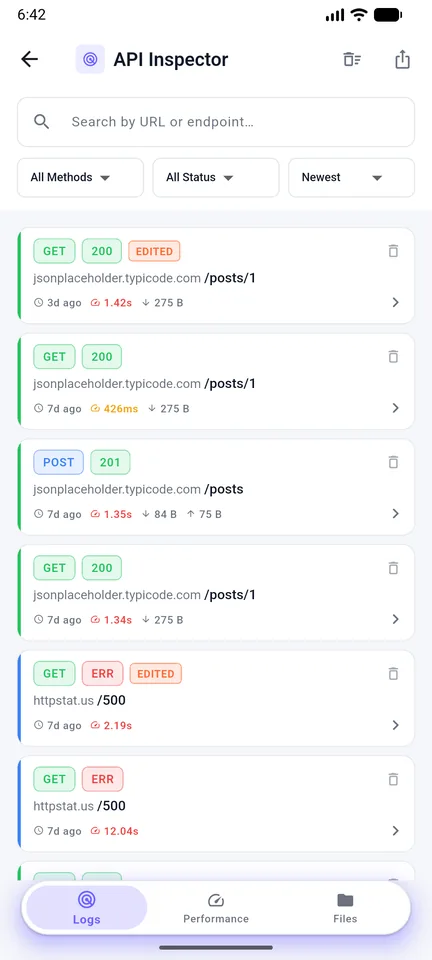


Everything you need to debug the network layer
One package for capture, inspection and replay on the device — and an optional dashboard when the bug is on someone else's phone.
Automatic capture
Dio interceptor, http client wrapper, or ApiStudio.log() for anything else.
Redaction by default
Tokens, cookies, passwords and card fields are masked before storage, upload and export.
Edit & replay
Change method, URL, headers or body of any captured request and send it again.
cURL, HAR & Postman
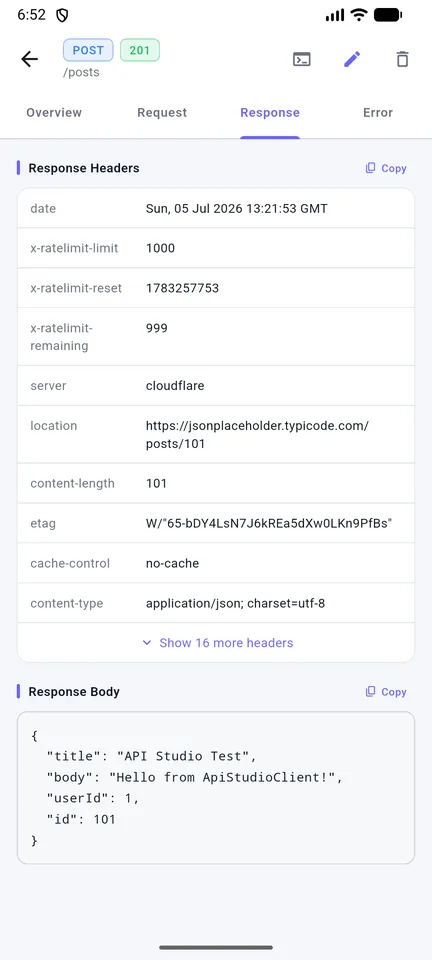
Copy as cURL or export JSON, TXT, HAR 1.2 and Postman v2.1 collections.
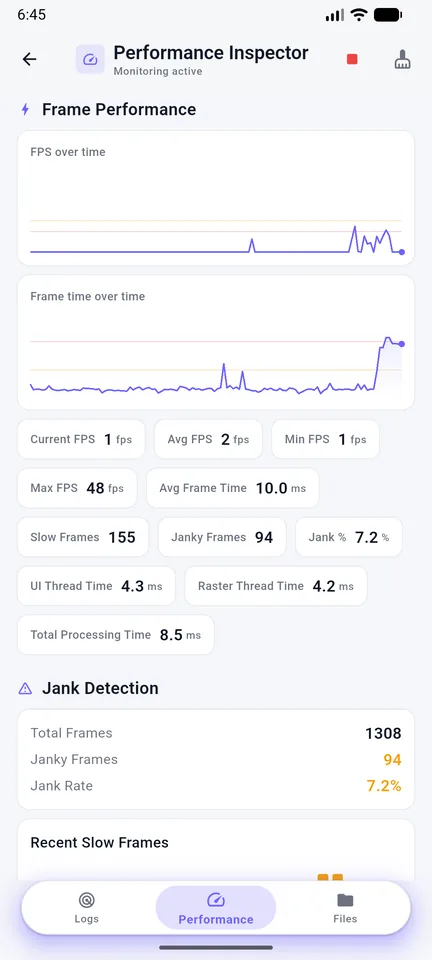
Performance inspector
FPS, jank rate, frame times, memory and startup phases — per screen.
Cloud logs
Add an API key and logs stream to your dashboard, filtered by project and environment.
Shareable links
Send a teammate a read-only link to the exact failing requests.
Web API client
Collections, history, environments and code generation in the browser.
From install to shared logs in three steps
The inspector works offline on the device. The cloud dashboard is optional and turns on only when you pass an API key.
Add the package
Add api_studio plus the adapter for your HTTP client.
# pubspec.yaml
dependencies:
  api_studio: ^1.3.0
  api_studio_dio: ^1.0.0
Initialize and attach
One call at startup, one interceptor. Every request now shows up in the inspector.
await ApiStudio.initialize(
  apiKey: 'YOUR_API_KEY', // optional
);
dio.interceptors.add(
  ApiStudioDioInterceptor());
Inspect & share
Open the inspector on the device, or filter logs on the dashboard and share a link with your team.
// on the device
ApiStudio.showNavigation(context);

// on the web
// apistudio.cloud → Logs → Share
Debug on the device, without a proxy or a cable
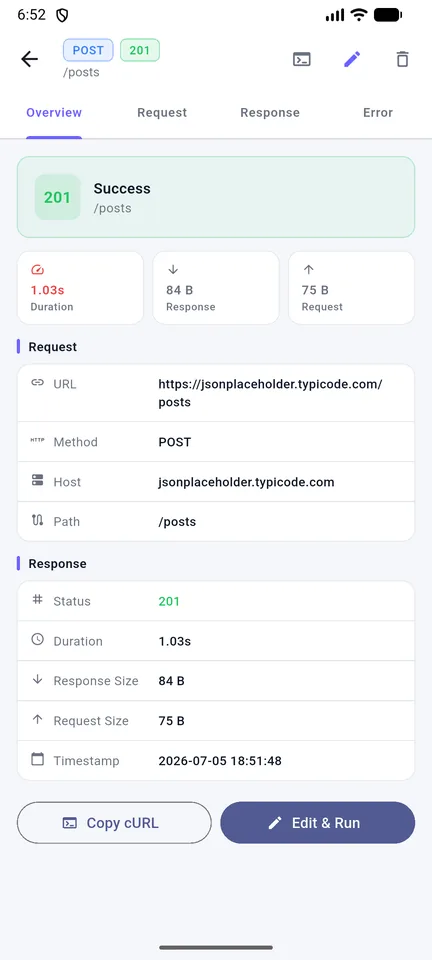
No certificates, no debugger attached, no fighting certificate pinning. Open API Studio from a floating button or a shake gesture and see the request, response, headers, timing and stack trace.
- Search and filter by URL, method and status, sorted by time or duration.
- Multipart, binary, cancelled and timed-out requests are captured and labeled.
- Release-safe: disabled outside debug builds unless you opt in for QA builds.
Know about a crash before your tester messages you
Turn on enableCrashReporting and every uncaught Flutter or Dart error lands on the Issues page, grouped with every other occurrence of the same bug, next to the API calls that led up to it.
- Grouped by cause: same exception and stack trace = one issue, with event and affected-user counts per release.
- Breadcrumbs: the requests, status codes and screens right before the crash, so “POST /orders 500 → StateError” is obvious.
- Resolve, ignore, reopen: a resolved issue reopens by itself if it comes back in a new build.
- Alerts: Slack, Discord or webhook for new issues, regressions, crash spikes and API failure spikes.
CheckoutBloc._onPayBad state: No element · 2.4.0+118OrderModel.fromJsontype 'Null' is not a subtype of 'String' · newApiClient.getFailed host lookup · regressed in 2.4.0Built for the bug that only happens on a tester's phone
| API Studio | Proxy tools | DevTools network tab | Other in-app inspectors | |
|---|---|---|---|---|
| No device setup or certificates | ✓ | — | ✓ | ✓ |
| Works without a debugger attached | ✓ | ✓ | — | ✓ |
| Unaffected by certificate pinning | ✓ | — | ✓ | ✓ |
| Team sees the same logs remotely | ✓ | — | — | — |
| Secrets redacted before storage | ✓ | — | — | varies |
| HAR & Postman export | ✓ | ✓ | — | varies |
{
  "url": "https://api.example.com/login",
  "request_headers": {
    "Authorization": "***REDACTED***",
    "Accept": "application/json"
  },
  "request_body": {
    "email": "qa@example.com",
    "password": "***REDACTED***"
  },
  "status_code": 200,
  "duration_ms": 184
}
Your secrets never leave the device
Redaction runs before anything is written to disk, uploaded or exported — not as an afterthought on the server.
- Headers: Authorization, Cookie, Set-Cookie, X-API-Key and more, out of the box.
- Body and query keys like password, token, secret, card_number and cvv, matched recursively.
- Your rules: add keys or a custom redactor hook for anything app-specific.
- Cloud is opt-in: nothing is uploaded unless you pass an API key.
Questions developers ask
Is API Studio free?
The SDK is open source under the MIT license and free forever. The cloud dashboard has a free plan with 3 projects and 5 API keys; paid plans add more projects, longer log retention and log sharing. See pricing.
Does it slow down my app or ship to production?
No. API Studio is disabled outside debug builds by default — no storage, timers, network or UI. Pass enabled: true only for the QA builds where you want it. Uploads are fire-and-forget and never block your requests.
Does API Studio report crashes?
Yes, since SDK 1.3.0. Pass enableCrashReporting: true with your API key and uncaught Flutter and Dart errors show up on the Issues page, grouped by stack trace with the API calls and screens that came before them. Your existing error handlers keep working. Add alert rules to get Slack, Discord or webhook messages.
Which HTTP clients are supported?
Dio through api_studio_dio, package:http through api_studio_http, and anything else (Chopper, GraphQL, gRPC-web, custom clients) through ApiStudio.log().
Do I need the cloud dashboard to use the inspector?
No. The in-app inspector works entirely on the device. The dashboard is for teams who want to see logs from testers' devices without the phone in hand.
What data is uploaded, and can I delete it?
Only already-redacted request logs from apps where you set an API key. You can delete projects, environments and your whole account from the dashboard at any time. Read the privacy policy.
Which platforms does it run on?
Android and iOS are the primary targets. The package also builds for Flutter web and desktop, where storage-dependent features such as local log history and the File Explorer are limited.
Stop asking “can you send me a screen recording?”
Install the SDK in two minutes. Create a free account when you want your team on the same page.